Revenue Analysis by Reservationist
Report parameters
|
Field |
Description |
|---|---|
|
Report Name |
The name of the report. |
|
Start Date |
The start date from when the data must be considered for generating the report. |
|
End Date |
The end date until when the data must be considered for generating the report. |
|
Choose Reservationist(s) |
Select a desired user from the available list. Users can select multiple or all the available reservationists from the list to be displayed in the report generated. |
Sample Report
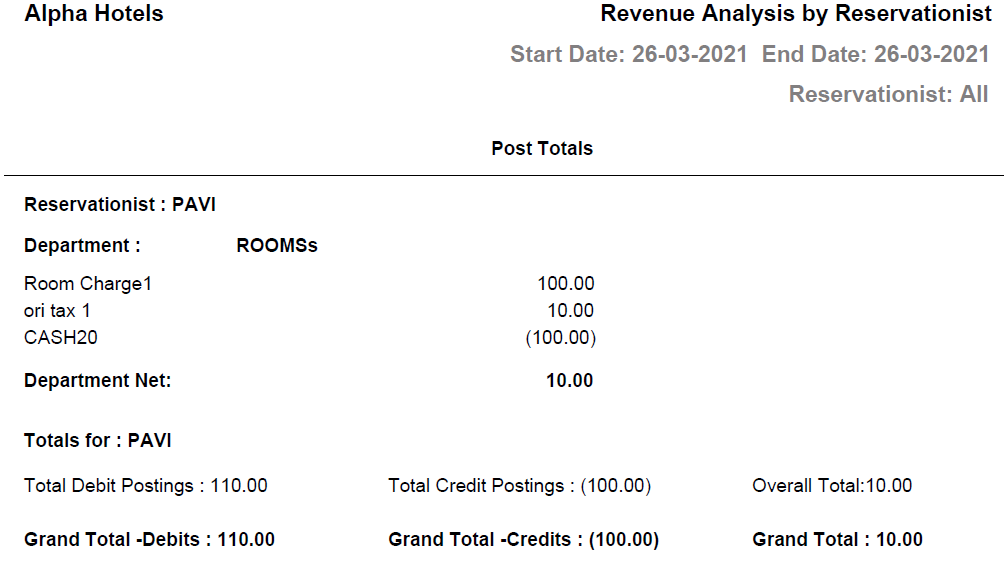
Report Fields
|
Field |
Description |
|---|---|
|
Post Totals |
|
|
Reservationist |
User ID of the reservationist. |
|
Department |
The department to which the revenue post type is associated. |
|
Department Net |
The sum of revenues for each department. |
|
Totals for |
The user with whom the totals are associated. |
|
Total Debit Postings |
Sum of charges/debit entries posted. |
|
Total Credit Postings |
Sum of payments/credit entries posted. |
|
Overall Total |
|
|
Grand total Debits |
The total of all the charges/debit entries posted. |
|
Grand total Credits |
The total of all the payments/credit entries posted. |
|
Grand total |
The total of all postings for all settlement types. |